 Droopify Team
On this page:
Why should I have multiple stores instead of tons of products on just one store?
The answer is simple and can be divided into two cases:
-
Private Accounts: they have defined and not very high selling limits, which prevent you from listing many products on these accounts. So, if you want to operate with private accounts but scale the number of products, you need to open multiple eBay stores. To learn more about selling limits, see this guide.
-
Business Accounts: These profiles, unlike the previous ones, do not have such restrictive selling limits. It depends on the account’s history, but they often allow you to publish tens of thousands of products right away. However, it’s up to the user to decide whether to upload everything on a single account or distribute it across multiple accounts. It’s often better to distribute products across multiple stores, so that if one day eBay, even by mistake, suspends one of your stores, you can still keep working with the other accounts while you try to recover the suspended one.
Note: eBay does not declare a maximum number of accounts, but it may apply checks in case of suspicious behavior.
As you increase the number of stores, the number of products you can manage also increases and, as a result, the orders you receive. In short, the more products you have in your catalog, the more likely you are to receive orders. This is because on eBay you can often gain visibility even without sponsored listings, unlike what may happen on other platforms (for example Shopify). On eBay, you take advantage of the marketplace visibility and the existing traffic: it’s like placing your products in a huge supermarket, where traffic is constant and people are already ready to buy.
Important: eBay allows you to manage multiple accounts, but it is against its policies to publish the same products on multiple accounts.
How to connect and manage multiple eBay accounts in Droopify
To manage multiple accounts using Droopify, you don’t need to create a Droopify profile for each eBay account. In fact, we recommend using a single Droopify account: it’s easier to manage and often also saves you money, because plans with higher inventory limits have a lower average cost per product.
For example, a 20,000 products plan costs €579.99. If instead you purchased 2 plans of 10,000 products, you would pay €329.99 × 2, which is €659.98. So it’s better to have one single plan rather than multiple Droopify subscriptions.
Important: Droopify’s inventory limit is total and shared across all connected stores. If you purchase a 1000 products plan, you can distribute those 1000 items across multiple stores. The limit is not per store: even if you connect 5 or 10 stores, the maximum will always remain 1000 total products, summing all items across every store (not 1000 per store).
How to connect multiple stores
To use multiple eBay accounts with the same Droopify account, you first need to connect them. Go to Settings → eBay Accounts, or click this link. Once on the page, click "Add eBay Account" in the top right and proceed with the connection by following the instructions provided by the eBay website.
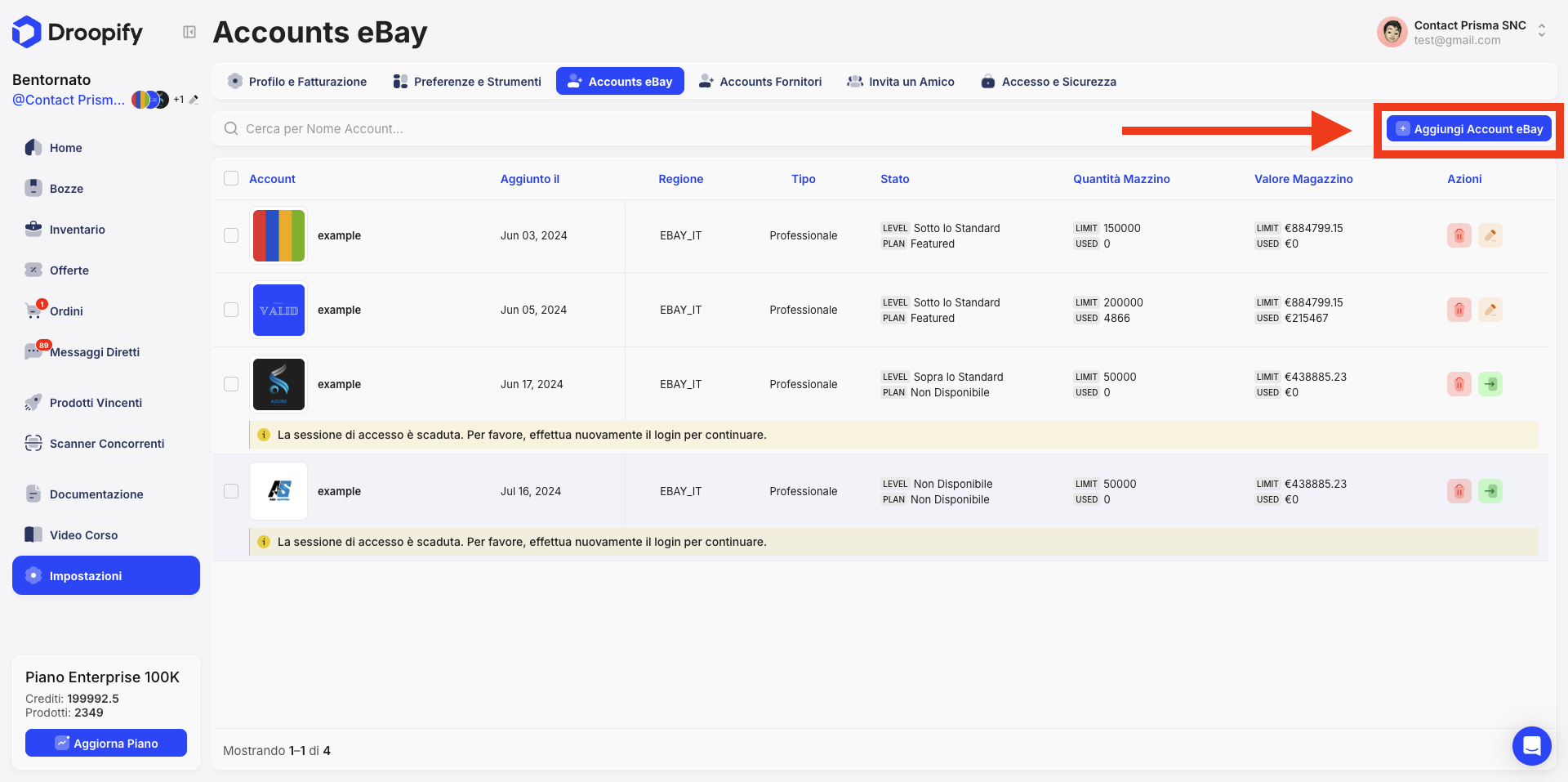
Once connected, you will see it appear directly on the page: it will be a new store just like the ones in the image. From here you can then manage the store settings. To do that, see this guide.
You can repeat this operation for all the stores you want to connect.
Filter the account view in Droopify
Once the setup is complete, you’ll be able to automatically import drafts and receive orders for each connected eBay profile. All data will be shown in a single general overview, so you always have full control of the situation.
Now let’s see how to filter the view and display data from a single account or only some selected accounts, so you can see an overview based only on the stores you care about. To do this, simply click the pencil icon in the top left, next to your store logos.
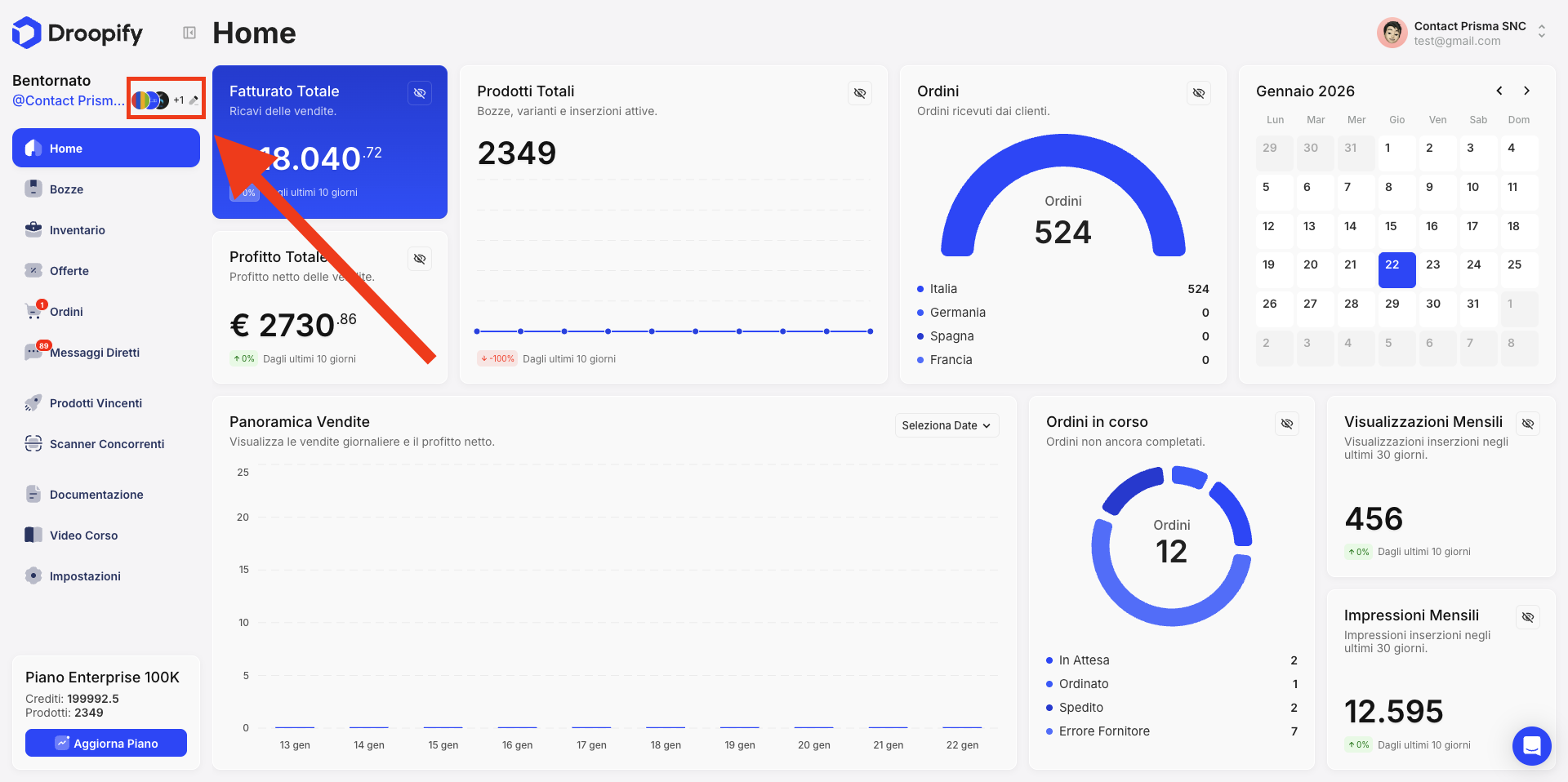
By clicking that icon, a menu will open with several options, where you can select the main account and also select or deselect the eBay accounts you want to include or exclude from the view. For example, if on the screen you deselect the first store shown in the photo, all sections such as Home, Drafts, Inventory, Orders, and Offers, will no longer include data from that profile. As a result, within each section you will not see drafts, products, orders, and statistics related to that store, allowing you to filter the view and see only the profiles you are interested in.
Important: By default, all drafts are assigned to the eBay account marked as "Main".
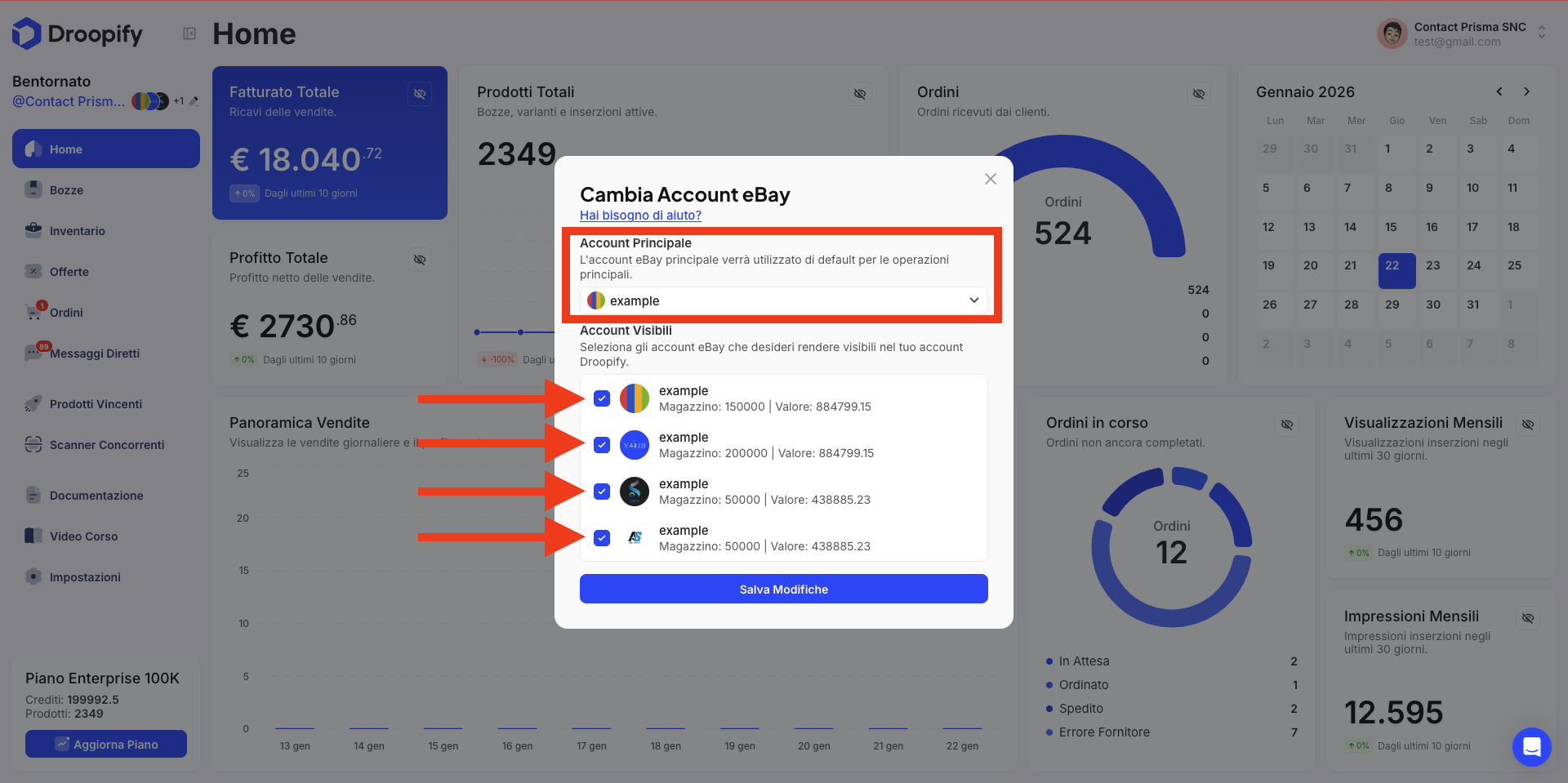
Change the eBay account where already created drafts will be uploaded
If you created some drafts and forgot to select the correct eBay account where you want to publish them later, no problem! You can change the eBay account where the listings will be published by following a few simple steps.
-
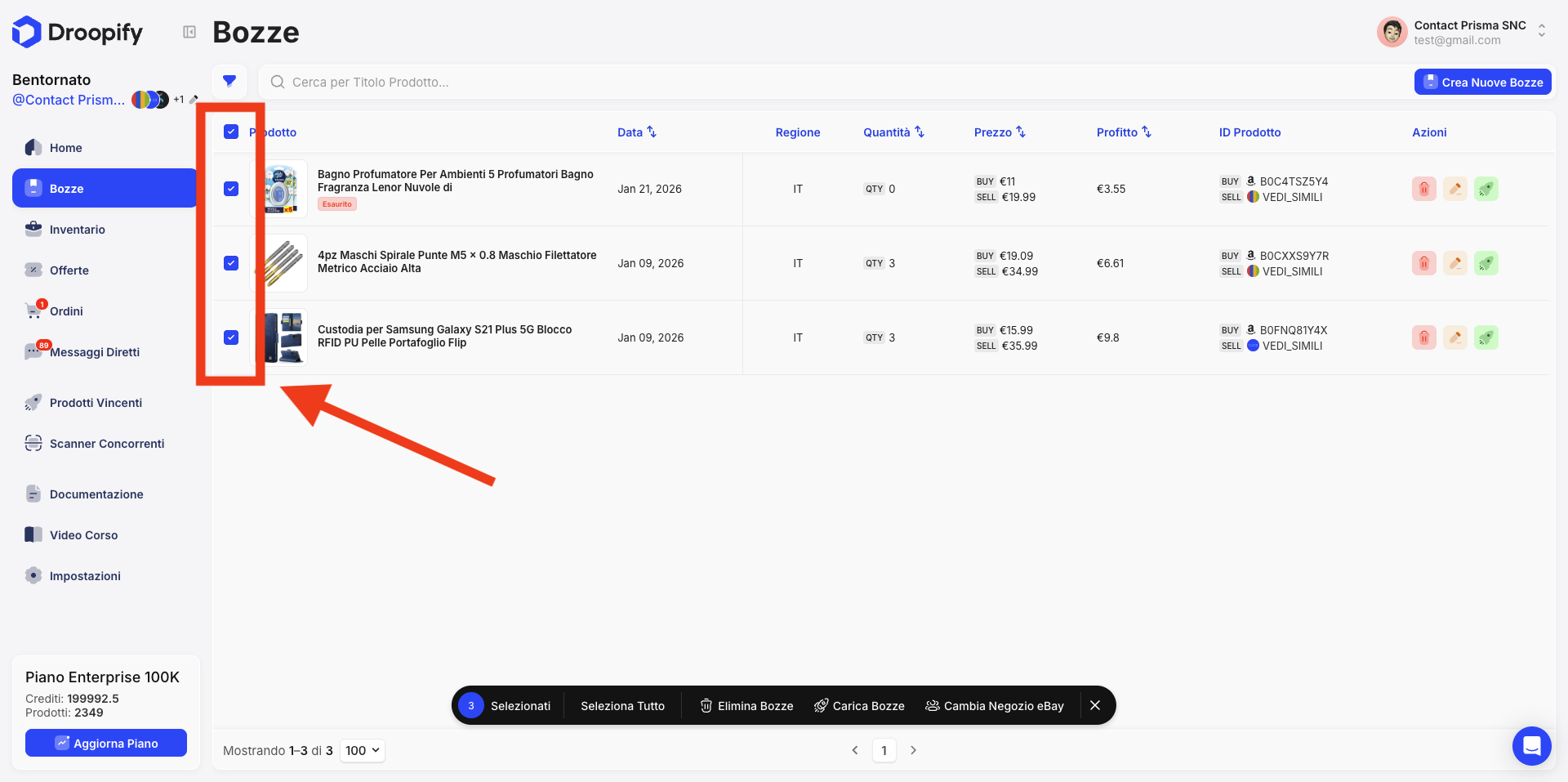
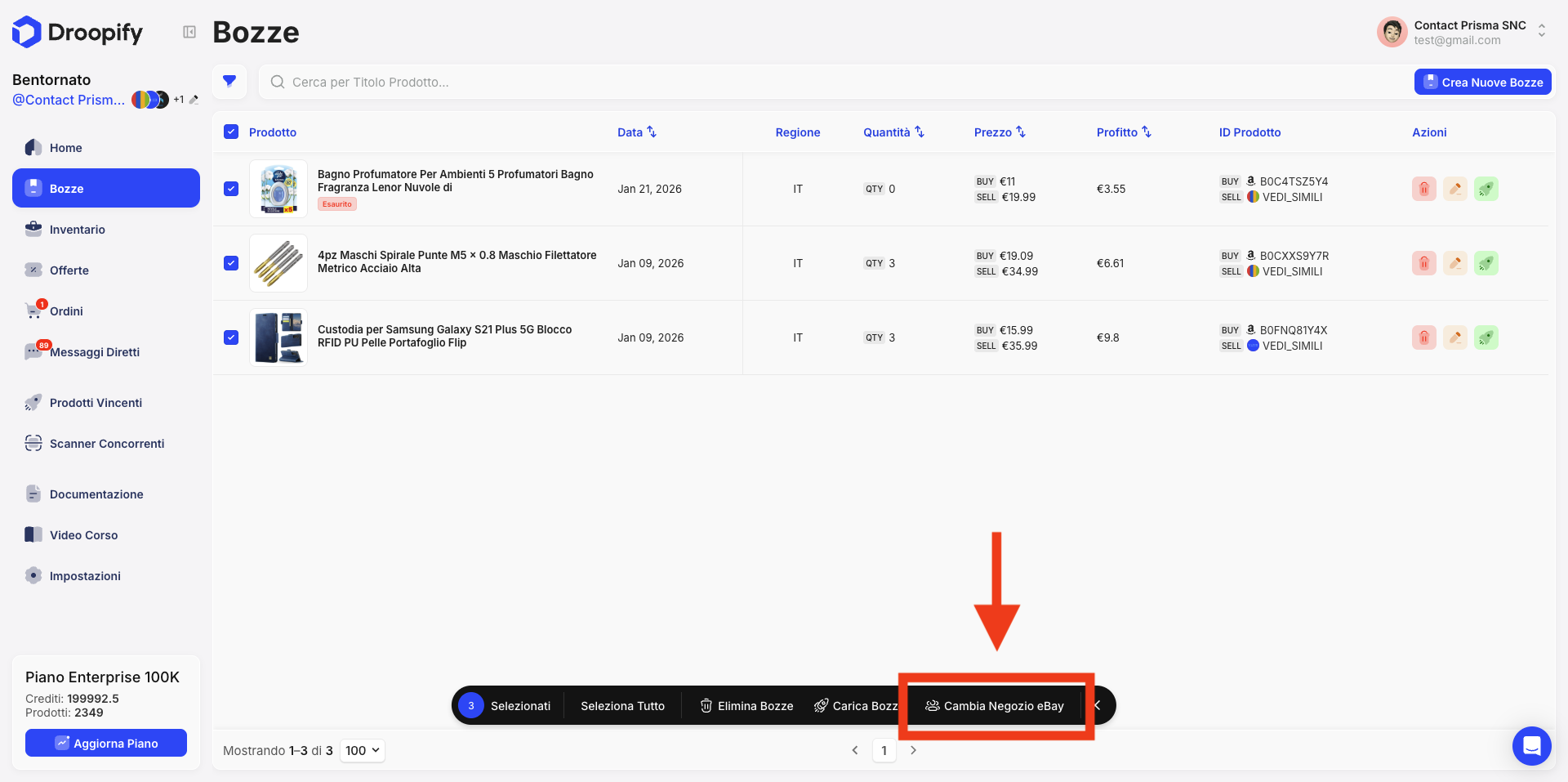
1) Select the desired drafts.
-
2) Click Change eBay store.
-
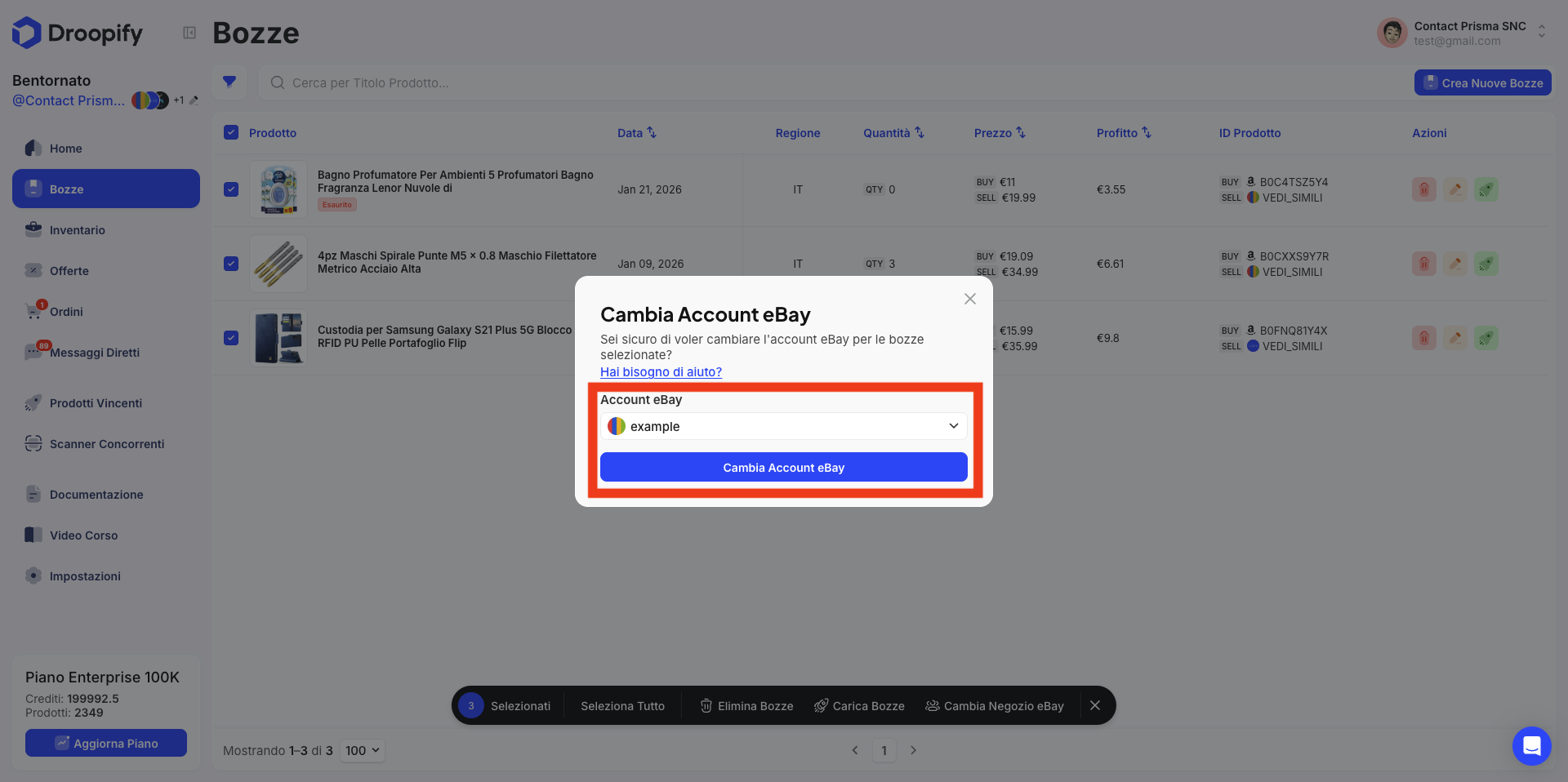
3) Select from the dropdown menu the new eBay store, then click “Change eBay Store”: done! ✅ The drafts will be moved from the current account to the selected one and, when you publish them, they will be published directly on that store.
Conclusion
Managing multiple eBay accounts is not just a “shortcut” to list more products: it’s a real growth and business protection strategy. Whether you work with private accounts (with stricter selling limits) or with business accounts (more flexible and scalable), distributing your inventory across multiple stores allows you to increase your product volume, receive more orders, and reduce the risk of being completely stuck in case of blocks or suspensions.
With Droopify, you can connect and manage all your eBay stores from a single dashboard, without having to create multiple Droopify accounts and without paying unnecessary extra costs. Plus, thanks to the view filters and the ability to move drafts between different stores, you always have full control over what you are publishing and where.
Just remember one key point: avoid listing the same products on multiple accounts, because it can lead to penalties or suspensions. Multi-account management really works when done in a smart, organized way that complies with the rules.
In short: more stores, more control, more scalability, and with Droopify, everything becomes simpler and faster too. ✅